
Sometime between now and mid-December, a lawyer at your firm will open Microsoft Word and find a set of legal skills waiting in the Copilot pane. Microsoft Copilot for Legal arrives switched on for every Microsoft 365 Copilot licence, so your firm may never make a formal decision about it. One of the first things it offers to do is draft a new agreement from your firm’s precedents.
So the first job with Copilot for Legal is housekeeping. The AI is new, and the templates it reads are the same ones your firm has been patching for years. Whatever is in them shows up in the first draft.
The Short Answer
Microsoft Copilot for Legal is a set of more than 20 legal skills inside Microsoft Word and Cowork, released on October 15 2026. It drafts from approved precedents in SharePoint, redlines with tracked changes and reviews contracts against playbooks. Law firms should clean up their templates first, because Copilot drafts from whatever precedents it can reach.
Table Of Contents
- What Is Microsoft Copilot for Legal
- What Copilot for Legal Does Inside Word
- Who Gets Copilot for Legal, and What It Costs
- Why Microsoft Built Copilot for Legal Now
- Copilot for Legal Drafts From the Precedents You Already Have
- What Copilot Sees When It Opens a Template
- 5 Template Problems Copilot for Legal Will Inherit
- Copilot for Legal vs Document Automation
- The Verification Step Still Belongs to a Lawyer
- What IT Should Decide Before Copilot for Legal Reaches Every Desk
- A 30-Day Readiness Plan for Law Firm Templates
- Where Word LX Fits
- 5 Questions to Ask Before a Firm-Wide Rollout
- FAQ
What Is Microsoft Copilot for Legal
Microsoft Copilot for Legal is Microsoft’s legal version of Copilot. The company announced it on October 15 2026 as “more than 20 purpose-built legal skills and new partner-built plugins,” building on the Legal Agent it had tested with early users since April.
The skills sit in 2 places. In Word, they work inside the document you already have open. In Cowork, Microsoft’s agent workspace, they handle longer jobs like obligation tracking across a set of contracts or building a case chronology.
Microsoft groups the skills into 5 jobs: drafting, review and negotiation, obligations, research and matter work. Behind them sits Work IQ, which Microsoft describes as the layer that connects Copilot to “the matters, standards, and information behind the work.” For a law firm, that means Copilot reads your documents, your SharePoint libraries and your playbooks, and works from what it finds there.
What Copilot for Legal Does Inside Word
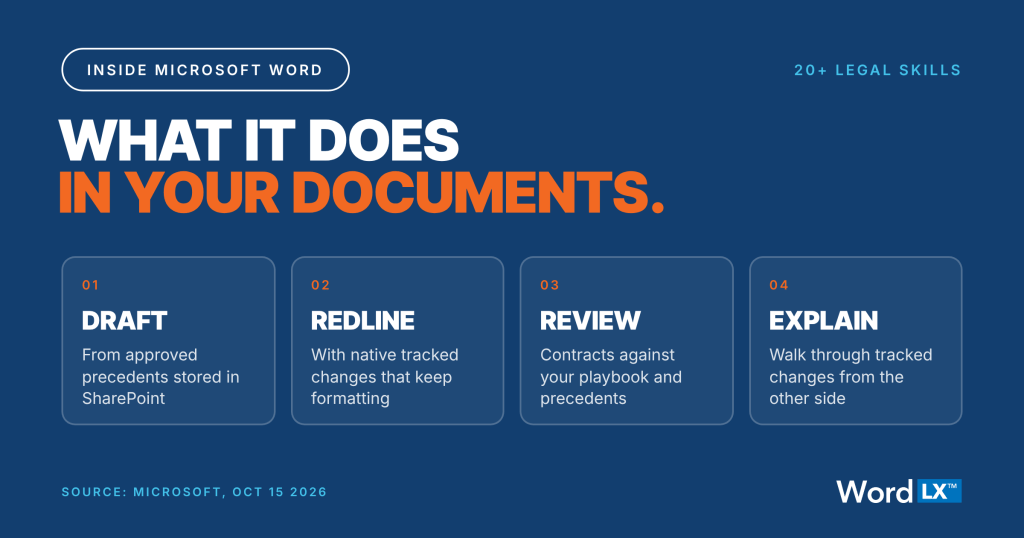
Inside Word, Copilot for Legal handles 4 jobs a lawyer will recognize straight away.
- Draft. Microsoft says Copilot “can draw on approved precedents in SharePoint, then use native Word content controls to create structured placeholders that remain editable and consistent throughout the document.”
- Redline. Copilot decides how a clause should change and Word applies the edit “as a native tracked change,” keeping the document’s formatting.
- Review. It checks an agreement against a playbook, flags terms that need attention and proposes tracked edits.
- Explain. It walks through tracked changes from the other side, and compares a draft against precedents and policies.
Microsoft has also previewed a Word feature for jumping between defined terms and their definitions. Every suggestion waits for a lawyer to accept it. Copilot “applies them only with the user’s approval.”
Who Gets Copilot for Legal, and What It Costs
Copilot for Legal comes with a Microsoft 365 Copilot commercial licence. Microsoft’s admin guidance is direct: “Within Word desktop, the legal plugin is enabled for all M365 Copilot commercial subscribers by default.” In Cowork, users have to add the legal plugin themselves.
The rollout runs from mid-October to mid-December 2026 worldwide, according to Microsoft’s message center notice. The older Legal Agent is being retired as the new skills arrive.
No separate price has been announced for the legal skills. Microsoft 365 Copilot itself lists at $30 per user per month, paid yearly, on top of a qualifying Microsoft 365 plan. So a firm that already pays for Copilot gets the legal skills as part of that licence. A firm that does not pay for Copilot will not see them.
Why Microsoft Built Copilot for Legal Now
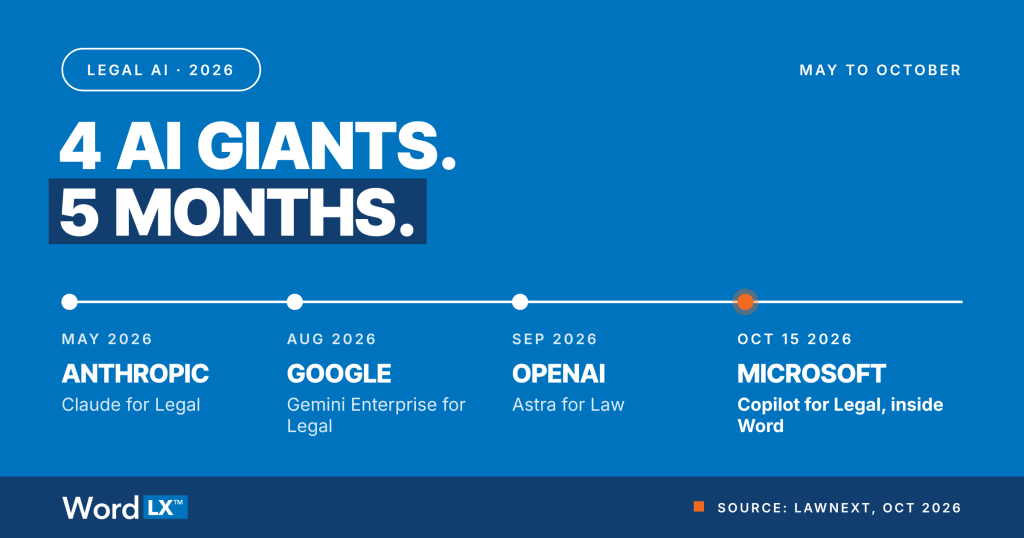
Microsoft arrived fourth. LawNext reported that it is the fourth major AI company in 5 months to build a legal product, after Anthropic in May, Google in August and OpenAI in September.
Microsoft also had the biggest head start. The ILTA 2026 Technology Survey, covering more than 500 law firms, found “the leader by a wide margin was Microsoft 365 Copilot, used by 76% of firms.” The same survey found 94% of firms using or exploring generative AI.
Michael McCready, owner of McCready Law in Chicago, told TechTarget that Microsoft’s place inside Word could matter more than having the best model: “It must be good enough that lawyers feel they never have to leave Word.” Most lawyers already spend their day in Word, so that is where Microsoft put the legal skills.
Copilot for Legal Drafts From the Precedents You Already Have
Read Microsoft’s launch post closely and one phrase carries most of the weight: “approved precedents in SharePoint.” Copilot for Legal drafts by starting from documents your firm already has. Microsoft adds that “approved templates and reusable playbooks help legal teams work from established standards.”
That is a sensible design. It also means the AI inherits every shortcut in your precedent library. If your firm keeps 3 versions of the mutual NDA, Copilot can find all 3. When the “approved” lease still carries a clause the real estate group stopped using in 2023, the first draft carries it too.
Firms are moving fast regardless. Clyde & Co’s CIO, Matt Simpkin, said in Microsoft’s announcement that Copilot “adoption is now approaching 90%” across the firm. Loren Jarrett of Progress Software put the risk plainly in a July 2026 survey release: “most firms are layering AI on top of broken, manual processes instead of rethinking how work gets done.”
What Copilot Sees When It Opens a Template
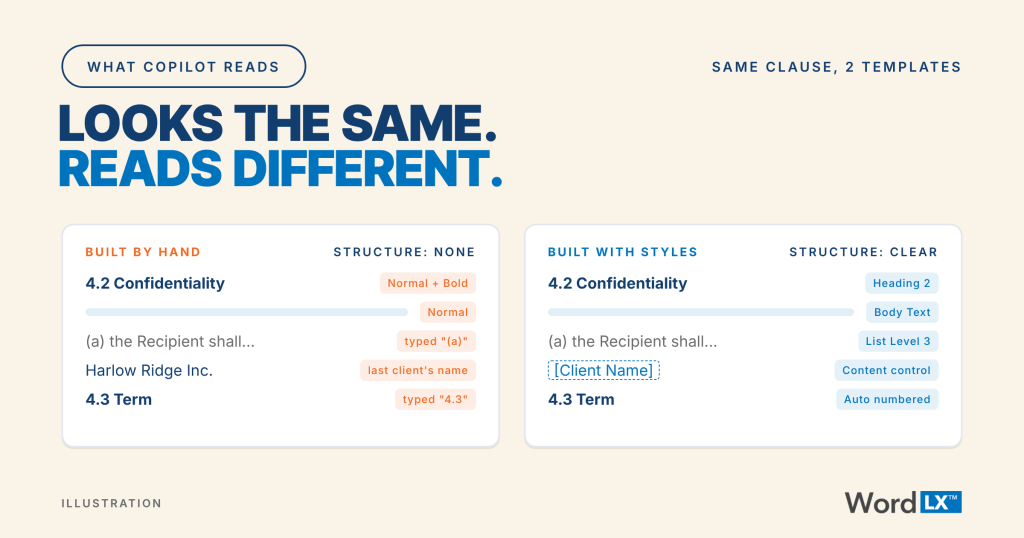
A lawyer reads a template with their eyes. Copilot reads its structure. On screen, a clause heading typed in bold Normal text looks exactly like a heading built with a Heading 2 Style. Underneath, only one of them tells Word where clause 4.2 starts and ends.
Microsoft’s own Word features lean on that structure. Its April 2026 update to Copilot in Word builds tables of contents “using Word’s built-in heading types.” The legal drafting skill fills “native Word content controls.” Templates built on Styles, automatic numbering and content controls give Copilot something reliable to work with.
Templates built by hand give it guesswork. Typed numbers, highlighted blanks and old client names all look like ordinary text. We covered why this matters in Microsoft Word Styles for Lawyers.
5 Template Problems Copilot for Legal Will Inherit

These are the 5 problems we see most often in law firm template libraries. Copilot for Legal will repeat each of them at speed.
- Duplicate precedents. The same document exists in several versions, each saved by a different group, and nobody recorded which one is current.
- Fake headings. Clause headings are bold Normal text where a heading Style belongs, so the document has no structure for software to follow.
- Typed numbering. Someone typed “4.2” and “(a)” by hand, and the sequence breaks the moment a clause moves. Our guide to legal document numbering in Word covers the fix.
- Leftover client data. Names, fees and dates from the last matter are still sitting in the precedent.
- No real placeholders. Blanks show up as underscores or yellow highlights, where Copilot expects content controls.
Copilot for Legal vs Document Automation
Copilot for Legal and rules-based document automation both produce first drafts in Word. They get there in different ways, and most firms will end up using both. Here is how they compare.
| Copilot for Legal | Rules-based document automation | |
|---|---|---|
| How it drafts | A language model writes from precedents and instructions | Assembles approved clauses from answers to set questions |
| Same inputs, same output | Not guaranteed | Yes, every time |
| Best for | Bespoke drafting, review, redlining, summaries | High-volume documents like engagement letters, NDAs, wills and leases |
| What it depends on | Clean precedents it can reach in SharePoint | A maintained template and clause library |
| Lawyer review | Every suggestion needs checking | Review the matter facts, then the standard text |
| Where it runs | Microsoft Word and Cowork | Microsoft Word, for Word-based tools |
The short version: Copilot for Legal is flexible, and automation is predictable. We made the longer case in AI Drafting vs Document Automation.
The Verification Step Still Belongs to a Lawyer
Microsoft’s own numbers make the point. In the Frontier program, more than 1,800 users generated nearly 100,000 edits and kept “roughly seven in ten suggestions.” That is a strong result for software. It also means about 3/10 suggestions were wrong or unwanted, and a lawyer had to spot which ones.
Microsoft’s Copilot in Word FAQ says Copilot “can’t understand meaning or evaluate accuracy, so be sure to read over what it writes.”
Courts are tracking the failures. Damien Charlotin’s AI hallucination database had identified 2,202 cases as of October 19 2026. Clean templates cut the checking load, because a lawyer can trust the standard text and focus on what changed. We called this cost the verification tax.
What IT Should Decide Before Copilot for Legal Reaches Every Desk
Copilot for Legal turns on for licensed users unless IT decides otherwise. Microsoft gives admins a policy in the Microsoft 365 Apps admin center called “Legal Skills in M365 Copilot in Word.” Decide how to set it before the rollout reaches your tenant.
The bigger question is what Copilot can reach. Copilot “works only with content each user can access,” and Microsoft’s SharePoint readiness guidance warns that “by default, SharePoint sets sharing settings to the most permissive option.” Steven Combs, writing in the ABA’s Law Technology Today, put it well: “Permissions set years ago and never revisited now define what an AI tool will surface on demand.”
Microsoft’s Restricted Content Discovery setting can keep old precedent sites out of Copilot’s answers while you clean them up.
A 30-Day Readiness Plan for Law Firm Templates
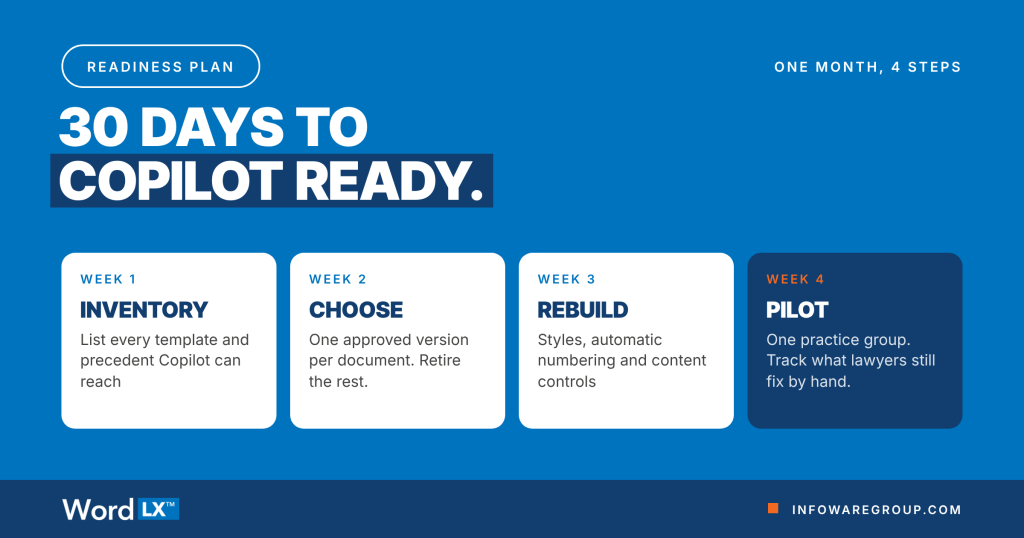
The goal for the first month is a library you know well, with one approved version of each document Copilot for Legal can reach. Here is a plan a firm can run in 4 weeks.
- Week 1, inventory. List every template and precedent library Copilot can reach, including SharePoint sites, the DMS and shared drives. Count the versions of your 10 most used documents.
- Week 2, choose. Pick one approved version of each document type, name an owner in each practice group, and move the rest out of Copilot’s reach.
- Week 3, rebuild. Fix the approved set with heading Styles, automatic numbering and content controls, and strip out old client data.
- Week 4, pilot. Give one practice group the legal skills first, and track what lawyers still fix by hand.
For the people side of the rollout, our guide to change management for legal tech covers what gets lawyers to adopt.
Free download
The Copilot for Legal Readiness Checklist
One page, 16 checks across 4 steps, and a score that tells you whether to roll out firm-wide, pilot first or fix your templates before Copilot reads them.
Download the checklist (PDF)Where Word LX Fits
Word LX works inside Microsoft Word, the same place Copilot for Legal now does. Its job is the part of this blog that comes before the AI: keeping the firm’s templates and clause libraries governed, current and built properly.
Word LX manages approved templates and clauses in one controlled place, so there is one version of each document instead of 3. It applies the firm’s Styles, numbering and branding to every document it builds, which gives any tool that reads those documents a clean structure to work from. Its document assembly handles the high-volume work where the same inputs should always produce the same output.
That leaves Copilot for Legal free to do what it does well, the bespoke drafting, review and redlining, on top of a library your firm can stand behind. If you want help getting there, our piece on enforcing firm-wide document standards is a good place to start.
5 Questions to Ask Before a Firm-Wide Rollout
Bring these to your next IT or knowledge management meeting.
- “Which SharePoint libraries will Copilot draft from?” If nobody can name them, start with the inventory.
- “Who decides which precedent is the approved one?” Name a person for each practice group.
- “Is the Word legal plugin on for everyone, or for a pilot group?” Decide on purpose.
- “How will lawyers check what Copilot changed?” Write the review step into the process before the first matter.
- “What will we measure after 30 days?” Time saved is one number. Edits lawyers still make by hand is the more honest one.
A firm with clear answers to all 5 is ready to give Copilot for Legal to everyone.
FAQ
The Basics
Microsoft Copilot for Legal is a set of more than 20 legal skills built into Microsoft Copilot, released on October 15 2026. It works inside Microsoft Word and Cowork, and drafts agreements from approved precedents in SharePoint, redlines with native tracked changes, reviews contracts against playbooks, tracks obligations and builds case chronologies.
Copilot for Legal is included for users with a Microsoft 365 Copilot commercial licence, and Microsoft has not announced a separate price for it. Microsoft 365 Copilot lists at $30 per user per month, paid yearly, on top of a qualifying Microsoft 365 plan. Firms without Copilot licences will not see the legal skills.
Copilot for Legal is turned on by default in Word desktop for every Microsoft 365 Copilot commercial user. Administrators can control access with a policy called “Legal Skills in M365 Copilot in Word” in the Microsoft 365 Apps admin center. In Cowork, each user has to add the legal plugin before using it.
Drafting, Automation and Safety
Copilot for Legal can draft from your firm’s templates when they are stored as approved precedents in SharePoint. It builds the new agreement from those precedents and adds Word content controls as placeholders. The quality of the draft depends on the precedent, so duplicates, typed numbering and old client data will carry through.
Copilot for Legal and document automation do different jobs, and most law firms will need both. The AI writes flexible drafts that need checking every time. Rules-based document automation produces the same approved output from the same answers, which suits engagement letters, NDAs, wills and leases. Most firms will use Copilot for bespoke work and automation for volume work.
Microsoft says Copilot for Legal processes prompts within the Microsoft 365 service boundary, works only with content each user can already access, honors sensitivity labels and does not train its models on firm documents. The risk sits in permissions, so firms should review who can access each SharePoint site before rollout.
Before Copilot drafts from them
Get your templates Copilot ready
Book a walkthrough and we will look at your most used templates with you, then show you how Word LX keeps one approved version of each, built on Styles, numbering and content your firm can stand behind.
Book a Word LX demo