Why your firm’s document system says more about your culture than any welcome packet ever will.
A new lawyer walks into your firm on day one. They have their laptop. They have their login. They have energy and ambition and a genuine desire to do great work. And then someone tells them to draft a letter.
That is where the trouble starts.
They ask around. “Where are the templates?” One person says to check the shared drive. Another says to look in Outlook for the last version someone emailed. A third says to just copy a document from a recent matter and change the names.
Three people. Three different answers. Zero confidence.
This is the reality of onboarding new lawyers at many firms, and the document workflow they encounter on their first day tells them everything about how the firm actually operates. When every article about “law firm onboarding” focuses on client intake, the internal experience of bringing a new associate into your document ecosystem gets completely overlooked. Yet this is where productivity habits form, where errors begin, and where new hires quietly start questioning whether the firm has its act together.
Your document workflow is the system your firm uses to create, format, store, and manage templates, styles, numbering schemes, and branded content. When a new lawyer joins a firm without a clear document workflow, they waste time searching for the right templates, copying from outdated files, and learning formatting standards through trial and error.
According to the Clio Legal Trends Report, legal professionals spend a significant portion of their day on non-billable administrative tasks. For a new hire still learning your systems, that percentage climbs even higher.
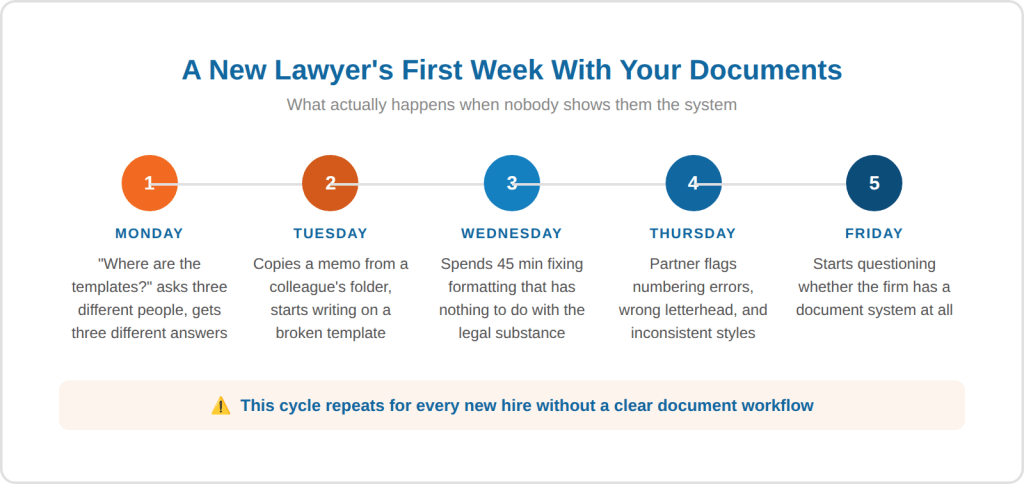
Table of Contents
- The Real Cost of a Messy Document Experience
- 5 Signs Your Document Onboarding Needs Work
- How to Build a Document Workflow That Onboards for You
- Where Document Automation Fits In
- Frequently Asked Questions
- Conclusion
The Real Cost of a Messy Document Experience
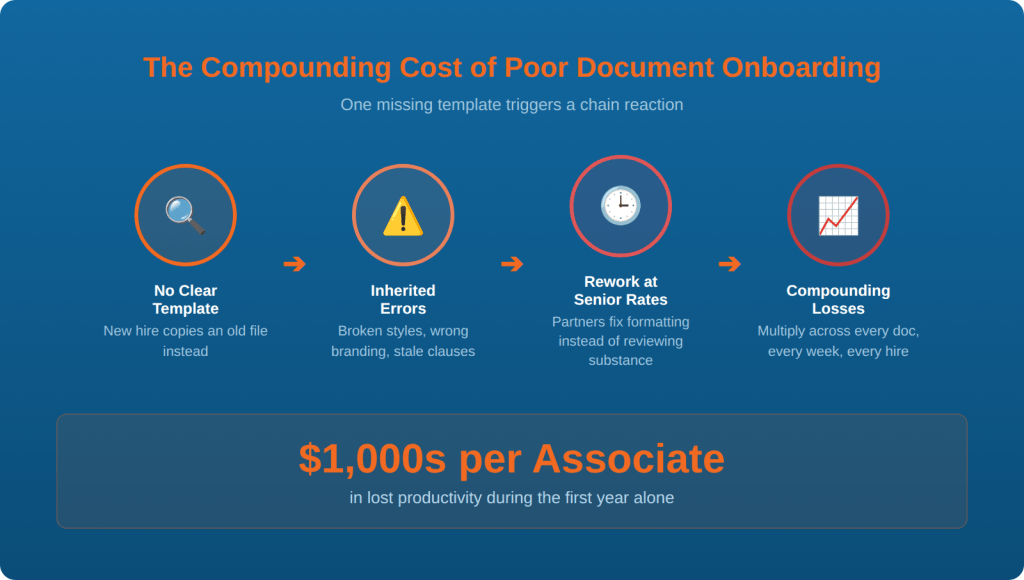
When onboarding new lawyers goes sideways at the document level, the damage compounds quickly. A new associate who copies from an old file will carry forward formatting problems, outdated clauses, stale branding, and potentially even confidential information from a prior matter. That single shortcut, born from the simple question “Where do I find a template?”, can trigger a chain of rework that costs the firm far more than the time it would have taken to set them up properly from the start.
Consider what happens in a typical scenario. A new lawyer copies a memo from a colleague’s folder. The formatting looks close enough, so they start writing. But the styles are broken, the numbering is inconsistent, and the letterhead belongs to a different office. They spend 45 minutes fixing layout issues that have nothing to do with the substance of their work. The partner who reviews it spends another 20 minutes flagging problems that should never have existed. Multiply that across every document the new lawyer produces during their first few months, and the hours stack up fast.
According to Thomson Reuters’ State of the Legal Market Report, firms that invest in operational efficiency see measurable improvements in both revenue and associate satisfaction. Document workflow is one of the most accessible places to start.
The cost goes beyond just wasted hours. A new lawyer who struggles with basic document tasks in their first weeks begins to associate the firm with disorganization. That early impression affects retention, engagement, and how quickly the associate becomes a productive member of the team. (Learn more about how law firms actually transform their operations.)
5 Signs Your Document Onboarding Needs Work
Most firms do not realize their document onboarding is broken until it causes a visible problem. Here are five signals that your new lawyer onboarding process has a document workflow gap:
- New hires ask multiple people where to find templates. If there is no single, obvious answer to “Where are our templates?”, your system is relying on institutional knowledge instead of infrastructure. (A Microsoft Word audit can help you identify exactly where templates live and whether they are current.)
- Associates copy from old documents instead of starting from templates. This is the most common workaround in firms without a centralized template system, and it is the fastest path to formatting chaos, metadata leaks, and branding inconsistency. (Our guide to best practices for lawyers using Microsoft Word covers how to break this habit.)
- Formatting corrections take up a meaningful portion of review time. When senior lawyers spend more time fixing styles and numbering than reviewing substance, the firm is paying partner rates for work that should be handled by the system.
- Documents from different lawyers at your firm look noticeably different. If a client could tell which associate drafted a document based purely on how it looks, your firm has a consistency problem. Every document should reflect the firm’s brand, regardless of who created it.
- You do not have a document training step in your onboarding checklist. If your new lawyer orientation covers HR policies, timekeeping software, and the coffee machine but skips how to properly create documents, you have left out the task that will consume the majority of their working day.
If any of those signs feel familiar, the fix does not require a massive overhaul. It starts with understanding how your documents are actually created today and where the gaps exist. (Read our blueprint for law firm efficiency to see where document workflow fits into the bigger picture.)

How to Build a Document Workflow That Onboards for You
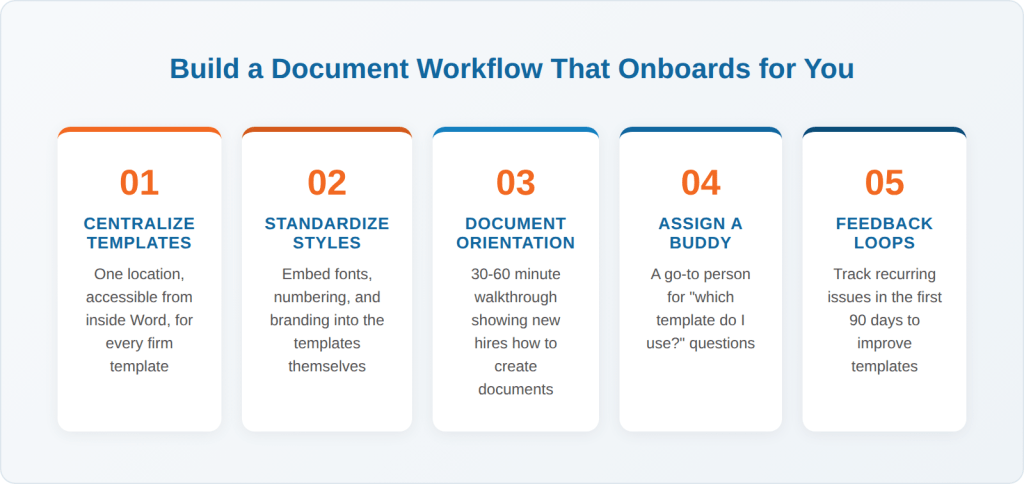
A strong document workflow removes guesswork. When a new lawyer sits down to create their first document at your firm, the process should be obvious, fast, and consistent. Here is how to build that experience:
Centralize Your Templates
Every template your firm uses should live in one place, accessible to every lawyer from inside Microsoft Word. When templates are scattered across shared drives, email chains, and individual desktops, new hires have no reliable way to find the right starting point. A centralized template system ensures that everyone begins from the same approved, current foundation. (See how Word LX centralizes templates inside the Word ribbon for instant access.)
Standardize Styles, Numbering, and Branding
Your firm likely has standards for how documents should look: specific fonts, heading structures, numbering schemes, and letterheads. But if those standards only exist in a style guide that sits in a drawer, new hires will never follow them. The standards need to be embedded in the templates themselves, so that following them is the default behavior. (Learn how standardized templates can save your firm time and money every day.)
Create a Document Orientation Step
Add a 30 to 60 minute document walkthrough to your onboarding process. Show new hires where templates are, how to access them, which styles to use, and how formatting tools work. This single step can eliminate weeks of confusion and rework. Think of it the same way you think about setting up their email or phone system. Documents are the tool they will use most, so treat the setup accordingly.
Assign a Document Buddy
Pair each new lawyer with someone who knows the firm’s document standards well. This does not have to be a formal mentor. It can be a legal assistant, a paralegal, or a senior associate who can answer questions like “Which template do I use for this?” in the moment. Having a go-to person reduces the friction of those first few weeks dramatically.
Build Feedback Loops
Track the formatting issues that show up in new hire documents during their first 90 days. If the same problems keep appearing, the issue is in the system, not the person. Use those patterns to improve your templates, your training, or both.
Where Document Automation Fits In
Document automation takes the principles above and scales them. Instead of relying on individual discipline to follow formatting rules, automation embeds those rules into the document creation process itself.
With a template management and document automation platform, new lawyers do not need to know which font the firm uses for headings or how to configure a legal numbering scheme. They select a template, fill in the required fields, and the system produces a properly formatted, branded document. The learning curve flattens. The error rate drops. And the new hire can focus on the substance of their work from day one.
This matters more as firms grow. A firm with five lawyers can probably manage document standards through informal conversations. A firm with 50 or 500 cannot. As Bloomberg Law has reported, spending even 15 minutes per day searching for documents adds up to more than 60 hours per year per lawyer. For new hires who do not know where anything is yet, that number can be significantly higher.
Automation also helps with consistency across offices. If your firm has multiple locations, practice areas, or even just multiple partners who prefer different layouts, a centralized system ensures that the firm’s brand stays intact no matter who creates the document or where they sit. (Read our guide to implementing software at your law firm for a smooth rollout.)
And if you are evaluating how AI tools fit alongside document automation, the answer is that they solve different problems. AI is powerful for drafting original content, while automation handles the repeatable, structured work that every firm does daily. Most firms benefit from having both in their toolkit. (Read our breakdown of AI drafting vs. document automation.)he wrong tool doing the wrong job.

Frequently Asked Questions
Onboarding a new lawyer involves more than HR paperwork and office tours. It should include system access, practice management training, and a dedicated document workflow orientation. Showing new hires where templates live, how to access firm-approved styles, and how to create properly branded documents eliminates confusion and sets them up for productive work from day one.
Every new associate should understand the firm’s template system, approved styles and numbering schemes, letterhead protocols, and how to properly start a new document. They should also know who to ask when they have questions about formatting. Firms that embed these standards directly into their templates through automation make the process far simpler, because the standards are built into the tools instead of living in a separate reference guide.
Most firms report that new associates take three to six months to reach full productivity. A significant portion of that ramp-up time involves learning internal systems and workflows, including how the firm creates and manages documents. Firms with centralized templates and clear document standards tend to shorten this timeline because new hires spend less time figuring out processes and more time doing substantive legal work.
Poor onboarding leads to longer ramp-up periods, higher error rates, increased rework, and lower associate satisfaction. When document workflows are unclear, new lawyers produce inconsistent work that requires correction at senior billing rates. The compounding effect of those inefficiencies over a new hire’s first year can represent thousands of dollars in lost productivity per associate.
Document automation platforms centralize templates, enforce formatting standards, and give every user access to the same firm-approved tools from inside Microsoft Word. For a new hire, this means they can create a properly formatted, branded document on their first day without needing to learn the firm’s entire style guide. The system handles the formatting, so the new lawyer can focus on the legal work.
Document standards are the rules that govern how a firm’s documents look and function. They typically include approved fonts, heading styles, numbering schemes, letterhead formats, margin settings, and clause libraries. Strong document standards ensure that every document the firm produces looks consistent and professional, regardless of which lawyer or assistant created it.
Conclusion
Every new lawyer who joins your firm will form an opinion about how things work within their first few days. The document workflow they encounter during that window, whether it is organized and intuitive or fragmented and confusing, shapes their experience more than almost anything else. Because documents are the work. They are the thing your lawyers spend the majority of their day creating, editing, formatting, and reviewing.
A strong document onboarding experience does not require a massive technology investment or a multi-month project. It starts with knowing where your templates live, making sure they are current, and giving new hires a clear path to find and use them. From there, you can layer in automation, training, and feedback loops to make the process better over time.
The firms that get this right see faster ramp-up times, fewer formatting errors, stronger brand consistency, and associates who feel supported from the start.