
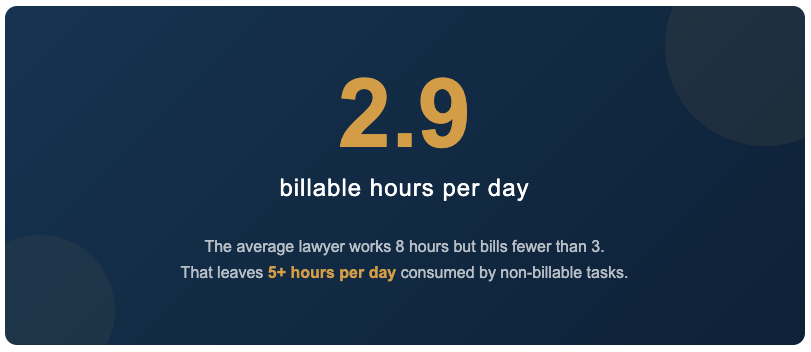
The average lawyer bills just 2.9 hours per workday. If you want to increase billable hours at your law firm, the answer probably has less to do with time tracking and more to do with what your attorneys spend the other five hours on.
That gap between hours worked and hours billed is where law firm profitability quietly erodes.
Most advice on increasing billable hours focuses on better time tracking, stricter policies, or billing software upgrades. Those tools help capture more of the work you already do. But they don’t address the real problem: too much of each day is consumed by work that should take a fraction of the time it actually does.
Document creation is one of the biggest offenders.
Formatting letters. Fixing numbering. Hunting for the right clause. Rebuilding templates from scratch. Cleaning up inconsistent styles. These tasks fill hours every week at most firms. None of that work is billable. All of it is avoidable.
This guide breaks down exactly where non-billable document work hides in your firm’s daily operations, and how to reclaim those hours for revenue-generating client work.
Table of Contents
- Why Non-Billable Hours Are Costing Your Firm More Than You Think
- Where Non-Billable Document Work Actually Hides
- How to Reduce Non-Billable Document Hours
- Measuring the Impact on Billable Hours
- Getting Started: A Practical First Step
- Frequently Asked Questions
Why Non-Billable Hours Are Costing Your Firm More Than You Think

Law firms typically require associates to hit between 1,700 and 2,300 billable hours per year.
At 2.9 billable hours per day, a lawyer working a standard five-day week logs roughly 754 billable hours annually. To close the gap between that number and a 1,900-hour target, attorneys end up working 60 to 80 hours per week.
The financial impact adds up fast. Every hour a lawyer spends reformatting a brief or rebuilding a template is an hour that could have been billed to a client.
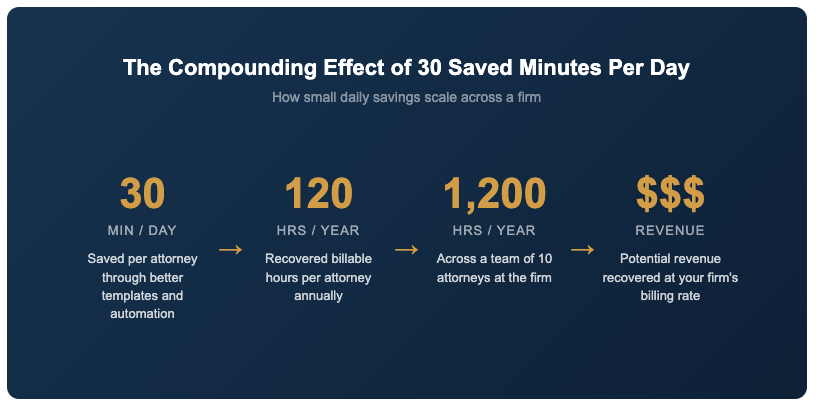
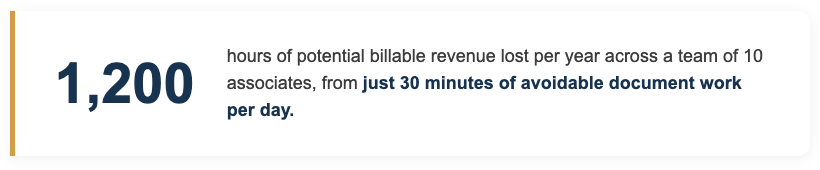
Even 30 minutes of avoidable document work per day adds up to more than 120 lost billable hours per year. Across a team of ten associates, that’s 1,200 hours of potential revenue that never reaches an invoice.
The downstream effects go beyond revenue. Attorneys who spend large portions of their day on administrative document tasks experience higher rates of burnout, lower job satisfaction, and greater turnover.
Replacing a single associate can cost a firm between $200,000 and $500,000 when you factor in recruiting, onboarding, and the lost productivity during the transition. Any firm looking to increase billable hours at their law firm needs to start by addressing the non-billable tasks that are eating into every attorney’s day.
Where Non-Billable Work Hurts Billable Hours at Your Law Firm
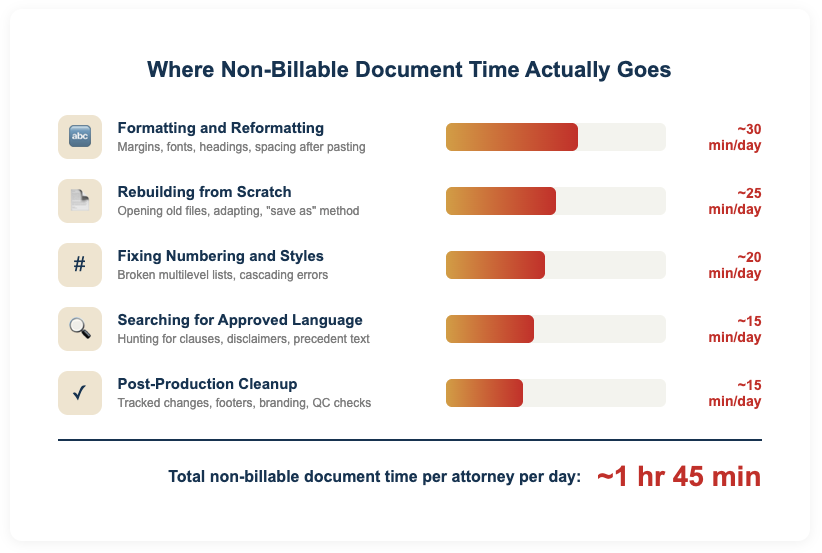
Most firms underestimate how much time goes to document-related tasks because the work is spread across dozens of small moments throughout the day.
No single task feels like a major time drain. But together, they represent a significant portion of each attorney’s non-billable hours.
Formatting and Reformatting
Adjusting margins. Fixing fonts. Aligning headings. Correcting spacing after pasting content from another source.
These are among the most common non-billable tasks in any law firm. They happen so frequently that most lawyers don’t even register them as lost time. But five minutes here and ten minutes there, repeated across every document throughout the week, quickly compounds into hours.
Rebuilding Documents from Scratch
When templates are outdated, hard to find, or simply don’t exist for a given document type, lawyers default to opening an old file and manually adapting it.
This introduces errors, wastes time, and produces inconsistent output.
The “save as” method feels fast in the moment. The cumulative cost across a firm is substantial.
Fixing Numbering and Styles
Ask any lawyer about their biggest Microsoft Word frustration, and numbering will likely top the list.
Multilevel numbering schemes break constantly in complex legal documents, especially when content is copied between files. Fixing a single numbering issue can consume 15 to 30 minutes. In documents with dozens of sections, the problem often cascades.
Searching for Approved Language
Lawyers routinely spend time tracking down the most current version of a standard clause, a firm-approved disclaimer, or a specific paragraph from a precedent document.
Without a centralized system for managing approved content, this search process relies on memory, email chains, and folder browsing.
The result: duplicated effort across the firm and a higher risk of using outdated language.
Post-Production Cleanup
Even after a document is substantively complete, many firms spend additional time on cleanup.
Removing tracked changes metadata. Standardizing footer information. Ensuring consistent branding. Running quality checks before a document goes out the door.
This “last mile” of document production is almost entirely non-billable and entirely repetitive.
5 Ways to Increase Billable Hours at Your Law Firm

The most effective approach to reclaiming billable time is to eliminate the manual steps that cause the problem in the first place.
Rather than asking lawyers to work faster, the goal is to remove the tasks that slow them down.
Standardize Templates Firm-Wide
A well-maintained template library is the single highest-impact change most firms can make to increase billable hours.
When every document starts from a professionally built, firm-approved template, lawyers skip the formatting phase entirely. Templates should include pre-set styles, correct numbering schemes, proper margins, and branded elements so that the document is production-ready before a single word of substance is typed.
The key is making templates easy to access and easy to maintain.
If templates live in a shared drive that no one updates, adoption will be low. The most effective systems give lawyers instant access to the right template from within Microsoft Word, without requiring them to navigate folders or remember file names.
Build a Clause Library
A centralized clause library allows lawyers to insert pre-approved language into any document with a few clicks.
Instead of searching through old files or emailing colleagues for the latest version of a standard paragraph, attorneys pull directly from a managed, up-to-date source.
This saves time on every document that includes standard language, which in most firms means the majority of documents produced. For any law firm trying to increase billable hours, a clause library is one of the simplest places to start. It also reduces risk by ensuring the language being used has been reviewed and approved, rather than copied from a file that may be several versions behind.
Automate Repetitive Document Elements
Signature blocks, date fields, client information, matter numbers, letterheads, and watermarks all follow predictable patterns.
Automating these elements so they populate dynamically based on a few inputs eliminates minutes of manual entry on every document. Over the course of a year, those minutes translate into meaningful gains in billable capacity and help law firms increase billable hours across the board.
Dynamic data fields can pull information from existing systems like your CRM or practice management software, reducing the need for manual re-entry and cutting down on the errors that come with it.
Lock Down Formatting at the Template Level
One of the most persistent sources of non-billable document work is formatting that breaks after a document has been edited by multiple people.
Styles get overridden. Numbering resets. Fonts change.
These issues are almost always fixable at the template level rather than the individual document level. Protected styles, locked numbering schemes, and restricted font options keep documents consistent without requiring lawyers to think about formatting at all.
Centralize Template Administration
Template management breaks down when updates depend on a single person emailing new files or posting them to a shared drive.
A centralized administration system allows template managers to push updates to all users simultaneously, ensuring everyone is working from the current version without any action required from individual lawyers.
This is especially important for multi-office firms where inconsistency between locations can create both efficiency and branding problems. A single administration portal for all templates, clauses, and firm-approved content keeps the entire organization aligned.
How Document Automation Helps Increase Billable Hours at Your Law Firm
Firms that implement structured document automation consistently report measurable improvements in billable capacity. The exact numbers depend on firm size and practice area, but the pattern is clear: reducing non-billable document tasks directly increases time available for client work.
A practical way to measure impact is to track the average time spent on document creation before and after implementing changes.
Many firms find that tasks like letter generation, which previously took 15 to 20 minutes, drop to under 5 minutes with proper templates and automation. For a firm producing dozens of letters per week, the time savings alone can recover several billable hours.
The compounding effect is what makes this approach so powerful.
A firm that saves each attorney 30 minutes per day on document tasks recovers roughly 120 hours per attorney per year. Multiply that across the firm and the revenue impact becomes significant, often exceeding the cost of the tools and setup by a wide margin.
Getting Started: A Practical First Step
You don’t need to overhaul your entire document workflow overnight to increase billable hours at your law firm.
The most effective starting point is to identify the five to ten documents your firm produces most frequently and evaluate how much time currently goes into creating each one. Look at the full process: finding the template, entering client information, formatting, inserting standard clauses, and final cleanup.
For most firms, this exercise reveals that a small number of high-volume document types account for a disproportionate share of non-billable time.
Improving just those documents with better templates, automated fields, and accessible clause libraries can produce immediate, measurable results. From there, expanding to additional document types becomes straightforward. The initial wins build momentum and make the case for broader adoption across the firm.
Frequently Asked Questions
Low billable hours are rarely a time management problem. In most cases, the issue is that too much of the workday is consumed by non-billable tasks like document formatting, template hunting, fixing numbering errors, and post-production cleanup. According to the Clio Legal Trends Report, lawyers bill just 2.9 hours per workday on average, with the remaining 5+ hours going to administrative and operational tasks. Reducing the time spent on repetitive document work is one of the fastest ways to increase billable output without extending the workday.
Non-billable hours include any time spent on tasks that cannot be charged to a client. Common examples include internal meetings, business development, training, administrative work, and document-related tasks like formatting, template management, and quality control. Document creation tasks are among the most significant sources of non-billable time because they occur throughout every attorney’s day but rarely get tracked or addressed as a category.
The most sustainable approach is to reduce the volume of non-billable work rather than increasing total hours worked. Standardizing templates, building clause libraries, automating repetitive document elements, and locking down formatting at the template level can save each attorney 30 minutes or more per day. That adds up to roughly 120 recovered billable hours per attorney per year, with no additional time at the office required.
While the exact number varies by firm and practice area, document formatting and related tasks like fixing numbering, rebuilding templates, and searching for approved language typically consume between 30 minutes and two hours per attorney per day. These tasks are spread across dozens of small moments, which makes the total easy to underestimate. Firms that audit their document workflows are often surprised by how much time goes to formatting-related activities that could be eliminated with better templates and automation.
Time tracking software helps you record and bill for the work you already do. Document automation reduces the amount of non-billable work you have to do in the first place. Time tracking captures hours more accurately, but document automation actually creates more billable hours by eliminating the manual formatting, clause searching, and template rebuilding that eat into each attorney’s day. The two tools solve different problems, and the biggest gains come from using both together.
Absolutely. Small and mid-size firms often see the largest relative impact because they have fewer support staff to absorb non-billable tasks. When a three-attorney firm saves 30 minutes per lawyer per day, that’s 360 recovered billable hours per year across the firm. Tools that work inside Microsoft Word without requiring complex setup or IT infrastructure are especially well-suited to smaller practices where simplicity and fast adoption matter.
Conclusion
Increasing billable hours at your firm doesn’t have to mean asking lawyers to work longer days or track their time more aggressively. The more sustainable path is to eliminate the non-billable work that fills their schedules unnecessarily.
Document creation is one of the largest and most overlooked categories of non-billable time in legal practice.
By standardizing templates, centralizing approved content, automating repetitive elements, and locking down formatting, firms can recover meaningful billable capacity without changing how lawyers practice law.
The firms that treat document efficiency as a revenue strategy, rather than an IT project, are the ones that see the biggest returns. Every hour reclaimed from formatting, searching, and rebuilding is an hour that can go directly to serving clients and generating revenue.
Ready to see how much billable time your firm could recover?
Word LX helps law firms eliminate non-billable document work by providing smart templates, clause libraries, and formatting controls that work directly inside Microsoft Word. Book a demo to see the difference.