
A director of IT at a mid-size firm sits through 3 vendor demos in the same month. The first rep talks about finding the final version of a file. The second talks about the life of a contract after signature. The third talks about building a first draft in 4 minutes. All 3 say “document” about 40 times an hour, and by the end of the month document automation and document management have blurred into one category, with CLM somewhere in the middle.
That blur is why the question of document automation vs document management vs CLM comes up in so many buying conversations. The 3 categories touch the same files, use the same words, and sell into the same budget. They solve 3 different problems, and buying the wrong one first can cost a firm a year.
The Short Answer
Document automation creates legal documents, generating first drafts from approved templates and clauses. Document management stores them, handling filing, versions, search and security. Contract lifecycle management (CLM) tracks contracts after drafting, through negotiation, signature, obligations and renewal. Most law firms need document management and document automation working together. CLM is built mainly for in-house legal teams.
Table Of Contents
- Why Document Automation, Document Management And CLM Get Confused
- What Is Document Automation
- What Is A Document Management System
- What Is Contract Lifecycle Management
- Document Automation vs Document Management vs CLM, Side By Side
- Where Document Automation, Document Management And CLM Sit In A Document’s Life
- Where Document Automation, Document Management And CLM Overlap
- Who CLM Is Built For
- When A Law Firm Does Need CLM
- What Goes Wrong When Firms Buy In The Wrong Order
- Document Automation Or Document Management: Which To Fix First
- How Document Automation And Document Management Work Together
- Where Word LX Fits
- 5 Questions To Ask Any Vendor In These Categories
- FAQ
Why Document Automation, Document Management And CLM Get Confused

The market itself lumps them together. Stanford’s CodeX Techindex, which tracks 5,761 legal technology companies, files 898 of them under a single category called “Document Management and Automation.” A buyer searching that list sees DMS vendors, template tools and contract platforms on the same page.
The vocabulary overlaps too. Every product in all 3 categories mentions templates, clauses, versions and search. Each one stores documents somewhere, so each one can fairly claim to “manage” them.
The difference sits in the job each system was designed to do. Ask what problem a tool solves on a normal Tuesday afternoon, and the 3 categories separate quickly. One builds the document, one keeps it safe and findable, and one watches a signed contract for the next 3 years.
What Is Document Automation
The ABA’s GPSolo eReport defines document automation as “the process of using software to create legal documents based on predefined templates and data.” In practice, a lawyer answers a short set of questions about the matter, and the system assembles a first draft from the firm’s approved template, approved clauses and client data.
Good document automation for law firms also controls how the draft looks. It applies the firm’s Styles, numbering, headers and branding, so the first draft already meets house standards.
The payoff sits in time. Thomson Reuters reports that lawyers spend as much as 40% to 60% of their time drafting documents. Much of that drafting repeats work the firm has already done hundreds of times. Engagement letters, NDAs, wills, share purchase agreements and court forms all follow patterns. We covered the mechanics in What Is Document Automation for Law Firms and Document Assembly Explained.
What Is A Document Management System
LawNext’s legal technology directory describes a legal document management system as one that “enables lawyers and law firms to store, organize, access and share electronic documents through a centralized shared repository.” Every file gets a profile with the client, matter, author and document type. The DMS keeps every version, controls who can open what, and makes the whole archive searchable.
For a law firm, the DMS is the system of record. Ethical walls, retention rules and audit trails live there. When a partner asks for the version that went to the other side on March 3, the DMS is where it comes from.
The category is dominated by 2 names. ILTA’s 2023 Technology Survey, as summarized by iManage, put iManage at 58% of firms as their primary DMS and NetDocuments at 24%. The rest of the market splits across Worldox, OpenText and a handful of others.
What Is Contract Lifecycle Management
Contract lifecycle management covers a contract from the first request to the final renewal. The Lex Mundi legal tech glossary defines CLM as “the management of an organization’s contracts from initiation through execution.” Gartner’s market listing for contract life cycle management names the core features as requesting, creating, negotiating, approving, storing, searching, reporting on and renewing contracts.
The phrase that matters there is “an organization’s contracts.” CLM manages the agreements a business signs with its own customers, suppliers and partners. It routes a sales contract to finance for approval, sends it out for e-signature, then reminds someone 90 days before it auto-renews.
The stakes are real for the businesses that run it. World Commerce & Contracting’s August 2025 research found “the average business loses almost 9% of value annually through poor contract management.”
Document Automation vs Document Management vs CLM, Side By Side
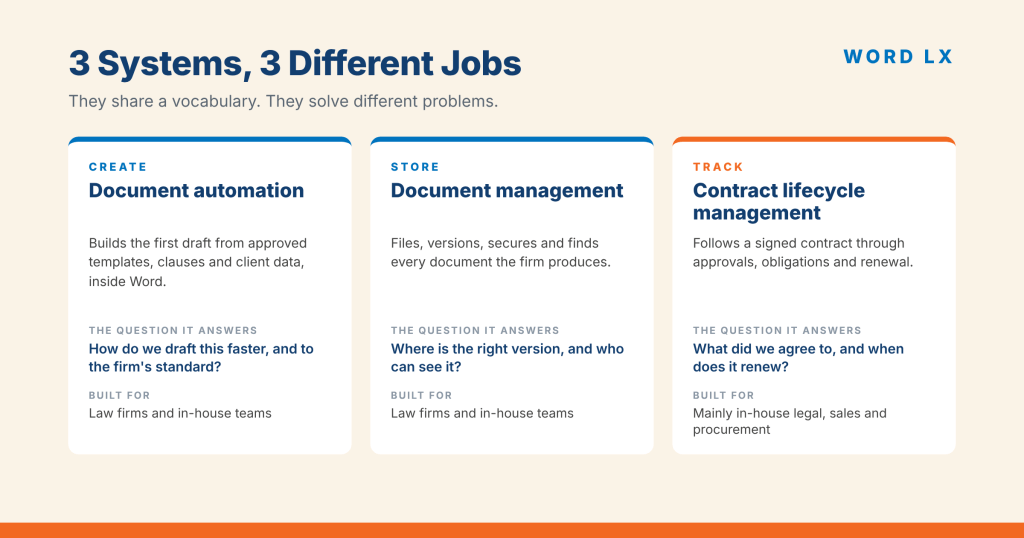
Here is document automation vs document management vs CLM on the questions buyers ask most.
| Document automation | Document management (DMS) | Contract lifecycle management (CLM) | |
|---|---|---|---|
| Core job | Create the first draft | Store, version and find documents | Track contracts after drafting |
| Main question it answers | “How do we draft this faster and to standard?” | “Where is the right version, and who can see it?” | “What did we agree to, and when does it renew?” |
| Primary users | Lawyers, assistants, paralegals | Everyone in the firm | Legal, sales, procurement, finance |
| Where it lives | Inside Microsoft Word | A central repository Word saves into | A separate platform, often in the browser |
| Typical buyer | Law firms and in-house teams | Law firms and in-house teams | Mainly in-house legal departments |
| Covers | Templates, clauses, data fill, formatting | Profiles, versions, security, retention, search | Requests, approvals, e-signature, obligations, renewals |
| Example products | Word LX and other Word-based drafting tools | iManage, NetDocuments, Worldox | Ironclad, Icertis, Agiloft, DocuSign CLM |
The table holds for most products in each category. Individual products stretch into their neighbours, which is where the next section comes in.
Where Document Automation, Document Management And CLM Sit In A Document’s Life

Picture any legal document moving through 3 stages.
Stage 1, create. A lawyer needs an engagement letter, a lease or a set of closing documents. Document automation does its work here, in Word, in the first 10 minutes of the document’s life.
Stage 2, store and collaborate. The draft is saved, profiled to a matter, revised by 4 people and sent out. Document management holds every version from this point until the file is closed and archived.
Stage 3, manage after signature. For a commercial contract, someone now has to track the payment terms, the termination notice period and the renewal date. CLM lives here.
A law firm spends most of its working day in stages 1 and 2. Stage 3 belongs mostly to the client who signed the contract, which shapes everything about who buys CLM.
Where Document Automation, Document Management And CLM Overlap
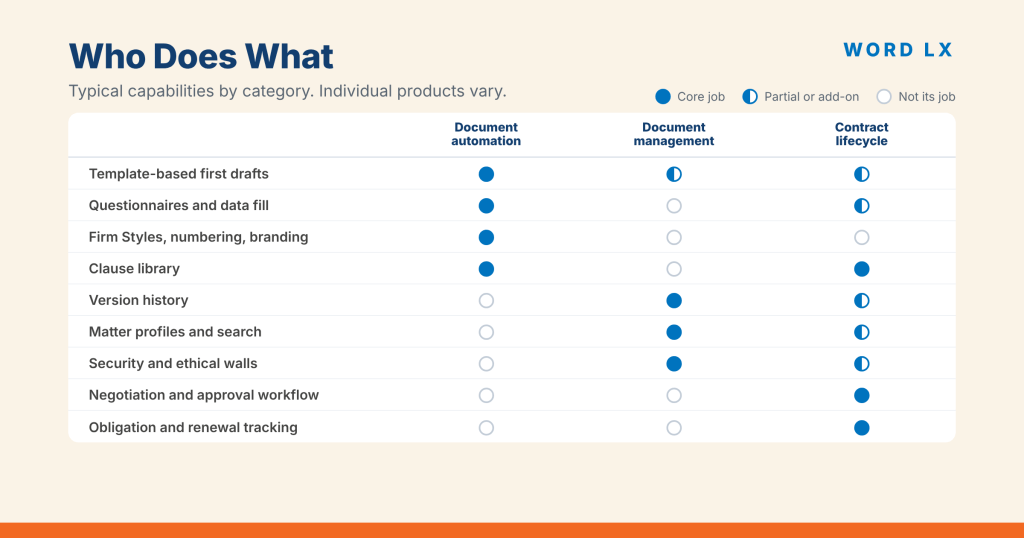
The overlap causes most of the confusion in the document automation vs document management debate, so it is worth naming each one.
- Templates. A DMS can store a folder of templates. Document automation turns a template into a working tool with questions, conditional clauses and data fill.
- Clause libraries. CLM platforms and document automation tools both offer them. CLM clause libraries usually serve negotiation playbooks for a company’s own contracts. Automation clause libraries serve drafting across every practice area.
- Versions. CLM tracks versions of a contract during negotiation. The DMS tracks versions of everything, including that contract.
- Search. Both the DMS and CLM search their own repositories. Document automation leaves search to the DMS.
Where a feature appears in 2 categories, ask which system the feature was built for. That answer usually tells you which one does it well.
Who CLM Is Built For
CLM grew up inside corporate legal departments, and the buying data shows it. A 2023 ACC and Exterro survey reported by Legal Dive found contract management software had become “the most commonly used legal technology among in-house legal departments,” with 65% of departments using it.
Gartner’s market definition lists sales, legal and procurement users as the audience. That describes a company managing its own deals with customers and suppliers.
Law firms usually show up on the advisory side of CLM. When Pinsent Masons signed a reseller deal with ContractPodAi in 2021, Legal IT Insider noted that “this kind of reseller arrangement is unusual among law firms.” The firm’s head of consulting, Mike McGlinchey, said plainly, “We don’t have a fully-fledged, mature contract lifecycle solution.” The firm was helping clients buy CLM for their own contracts.
When A Law Firm Does Need CLM
There are 3 situations where CLM earns a place in a law firm.
- The firm runs contract management as a service. Some firms offer managed contracting to clients, handling high volumes of NDAs, supplier agreements or leases on the client’s behalf. A CLM platform tracks those obligations properly.
- A large practice group manages a client’s portfolio. A real estate group managing hundreds of leases for one landlord needs renewal dates and notice periods tracked across the whole portfolio.
- The firm’s own contracts outgrow a spreadsheet. Vendor agreements, software licences and office leases still need tracking. Most firms handle this volume in the DMS with a calendar, and only very large firms need more.
If none of these describes your firm, CLM is probably a tool your clients buy. Your firm may advise them on it, and your drafting work may flow into it, without the firm owning a licence.
What Goes Wrong When Firms Buy In The Wrong Order
The most common mistake is expecting one system to solve another system’s problem. Ron Friedmann, a legal technology and KM consultant, wrote about this with DMS rollouts in 2004: “Originally, I and many others thought that DM would solve the work product retrieval problem.” His point holds for drafting too. A DMS can hold 40,000 precedents, and a lawyer still rebuilds the next agreement by hand from the closest one they can find.
CLM brings its own risk when bought early. Zack Hutto, a director in Gartner’s legal and compliance practice, has warned that “legal departments that choose to follow a ‘big bang’ approach and implement advanced contract life cycle management (CLM) solutions and features will limit success and ultimately accomplish only a fraction of the expected value.” Gartner predicted those departments would capture only 30% of the potential benefit of their CLM spend by 2025.
Lucy Bassli, a consultant on contracting processes, told Bloomberg Law in 2025, “There’s no amount of tech you can throw on its own that will solve the problem without people, the process and, very importantly, the policy.” Getting the order right is part of that process.
Document Automation Or Document Management: Which To Fix First

Start with the problem you can see this week. When the choice is document automation vs document management, these 4 questions point to the right system.
- Do people struggle to find the final version, or does email act as the filing system? Fix document management first. Every other system depends on it.
- Do lawyers rebuild the same documents from old precedents, and do formatting and numbering break on the way? Document automation is the gap.
- Are first drafts inconsistent between offices, practice groups or new hires? Document automation again, with firm-wide templates and Styles behind it.
- Does the firm track signed contracts for clients as a paid service? Then CLM belongs on the list.
Most mid-size and large firms already own a DMS. ILTA’s 2025 Technology Survey found 88% of firms are “either ‘mostly in the cloud’ or moving to the cloud with every upgrade,” and much of that move is the DMS. For those firms, document automation is usually the next problem worth solving.
Free download
The Document Systems Buyer’s Map
One page. What each system does, the signs your firm needs it, the questions to ask each vendor, and a 6 point score to find out which one to fix first.
Download the buyer’s map (PDF)How Document Automation And Document Management Work Together
Document automation and document management work best as a pair. Automation builds a clean, standard document in Word. The DMS receives it, profiles it to the right client and matter, and keeps every version after that.
The handoff is where firms lose time. A draft built from a stale template saved to the desktop, then uploaded to the DMS with the wrong profile, creates 2 problems at once. The template drifts from the firm standard, and the file drifts out of the record.
The document automation vs document management question usually ends with a firm running both, connected. When the 2 systems connect, the draft starts from the current approved template and saves straight into the correct matter workspace. The lawyer never leaves Word. The firm’s knowledge stays in one governed place. We wrote about the governance side in How to Enforce Firm-Wide Document Standards, and about the full cost of getting there in Legal Document Automation Cost.
Where Word LX Fits
Word LX sits in the document automation category, inside Microsoft Word, where lawyers already draft. It manages the firm’s templates and clause libraries, assembles documents from approved content, and keeps Styles, numbering and branding consistent across every document the firm produces.
Word LX works alongside the DMS. It integrates with iManage and NetDocuments, so documents created in Word LX save into the firm’s existing system of record with the right profile. Infoware announced its integration partnership with NetDocuments to connect the 2 systems.
CLM sits outside the job Word LX was built for. If your client needs obligation tracking and renewal alerts, a CLM platform will do that job. Word LX makes sure the contract that goes into it was drafted from the right template, in the right format, with the right clauses. If you are weighing a build of your own, our comparison of Word LX vs In-House Templates covers that decision.
5 Questions To Ask Any Vendor In These Categories
Use these in any demo, whichever category the vendor sits in.
- “What problem does your product solve on day 1, without anything else installed?” The answer tells you which category the product belongs to, whatever the website says.
- “Where do my lawyers do the work?” Anything that pulls drafting out of Microsoft Word needs a strong reason.
- “How does it connect to iManage or NetDocuments?” Ask to see a document saved and profiled live.
- “Who maintains the templates and clauses after go-live?” Name a person and the hours each month.
- “Show me a firm our size using it 2 years in.” Adoption after the first year is the real test.
A vendor who answers all 5 clearly has probably told you which job its product does best.
Document Automation vs Document Management FAQ
The difference between document automation and document management is the job each does. Document automation creates documents, building first drafts from approved templates, clauses and client data. Document management stores documents after they exist, handling versions, profiles, security, retention and search. Law firms usually need both, with automation feeding finished drafts into the DMS.
CLM and document management do different jobs. A DMS stores and secures every document a firm creates, across all practice areas. Contract lifecycle management tracks contracts through negotiation, approval, signature, obligations and renewal. CLM stores contracts too, but only as part of managing what an organization agreed to and when each deal comes up for renewal.
Law firms need CLM software in a narrow set of cases. CLM is built mainly for in-house legal, sales and procurement teams managing their own contracts. A law firm benefits from CLM when it runs contract management as a service for clients, or manages a large contract portfolio on a client’s behalf, such as a landlord’s leases.
A document management system stores templates and keeps each template file safe and versioned. To automate documents, a firm needs document automation, which turns that template into a working tool, asking questions about the matter, inserting the right clauses and client data, and applying the firm’s formatting to produce a finished first draft.
Most mid-size and large law firms need both document automation and document management. Document automation produces consistent first drafts inside Microsoft Word. Document management stores those drafts, tracks every version and controls access. The 2 systems work best connected, so each new document saves straight into the right client and matter workspace.
A law firm should implement document management first, because every other system depends on a reliable record of documents. Most mid-size firms already have a DMS such as iManage or NetDocuments. Document automation usually comes next, to fix drafting time and consistency. CLM comes last, and only if the firm manages contracts for clients as a service.
Document automation inside Microsoft Word
See where Word LX fits next to your DMS
Book a walkthrough and we will look at your templates, your drafting workflow and your iManage or NetDocuments setup, then show you how Word LX builds clean first drafts that save straight into the right matter.
Book a Word LX demo